
Billing & Plans
Free forever, with Pro and Business for teams that need more
How GeoSwap plans work
Every geo feature is free. Really. All ten products, unlimited links, redirects, rules, segments, and custom domains, A/B testing, API access, CSV export — it all works on the Free plan, with fair-use sessions and no credit card.
Paid plans don't unlock the geo products — they add deeper analytics (all pages, pages by country, visitors, campaign funnels, and time on page & bounce rate on Business), team roles, longer history, and room to grow: Pro ($99/mo per workspace) for growing teams, and Business ($299/mo + usage) for marketing teams running campaigns at scale. Large programs can talk to us about Enterprise.
Plan Comparison
Feature
Free
Pro
Business
Price
$0 forever
$99/mo
$299/mo + usage
All 10 products
✓ Unlimited
✓ Unlimited
✓ Unlimited
Links, redirects, rules & segments
✓ Unlimited
✓ Unlimited
✓ Unlimited
Custom domains
✓ Unlimited
✓ Unlimited
✓ Unlimited
A/B testing, API, CSV export
✓
✓
✓
Sessions
Fair use (~100K/mo)
Fair use (~200K/mo)
Unlimited, guaranteed — 100K/mo included, then $1 per 1K
Analytics history
7 days
90 days
12 months
Top pages report
Top 10
All pages
All pages
Pages by country, visitors & campaigns
—
✓
✓
Bounce rate & time on site
—
—
✓
Team roles
Owner + viewers
+ unlimited admins
+ admins + editors
Uptime SLA
—
—
99.95% (service credits on request)
Onboarding & migration help
—
—
✓
Support
Email
Email
Priority
Need SSO, custom volume, custom SLA terms, an MSA, or invoicing? Enterprise starts at $5K/mo. Talk to us about Enterprise →
Sessions and usage

A session is one person's visit to your site, however many pages they view, ending after 30 minutes idle. Each visit to a GeoSwap short link is one session, so a short link that lands on a site running the GeoSwap script counts as two: the link session and the site session. People and bots both count.
Every session is counted and broken down, so you see exactly how much of your traffic is people and how much is search engines, AI crawlers, link-preview bots and other automated clients.
Free and Pro are fair use — sessions aren't metered or charged. As a guide, that's about 100K sessions a month on Free and 200K on Pro. If you're consistently above it, we'll get in touch and suggest the right plan; we never switch your links off without talking to you first.
Business sessions are unlimited and guaranteed. 100K a month are included; beyond that they're billed at $1 per 1,000 on your next invoice. Your links never stop.
Worried about someone copying your script tag onto another site? Turn on Only listed sites in Settings → Admin. Traffic on domains that aren't on your list is never billed and doesn't count toward your sessions.
Your usage resets every billing period (calendar month on Free and Pro). See it any time in Settings → Billing.

We never switch your links off.
Other geo-targeting tools stop serving your rules when you run out of pageviews. GeoSwap doesn't, on any plan. Going over your included sessions never breaks a redirect, a link, or a campaign.
Example: a Business workspace with 250,000 sessions in a month pays $299 + (150 × $1) = $449 for that month.
When to Upgrade
Most users never need a paid plan. Here's why teams upgrade:
You need the Admin role (Pro)
On Free, your team members are Viewers (read-only). Pro unlocks unlimited Admins, so colleagues can create and manage rules, members, and domains.
You want longer analytics history (Pro or Business)
Free keeps 7 days of analytics. Pro extends that to 90 days; Business keeps 12 months, so you can compare campaigns year-over-year.
Your marketing team ships campaigns (Business)
Business adds the Editor role: editors create and update links, redirects, and rules, but can't delete anything or manage members, domains, API keys, or billing. See all roles →
You need guaranteed, unlimited volume (Business)
If you run shortlinks for paid, email, SMS, or print campaigns at volume, Business gives you predictable usage pricing and priority support.
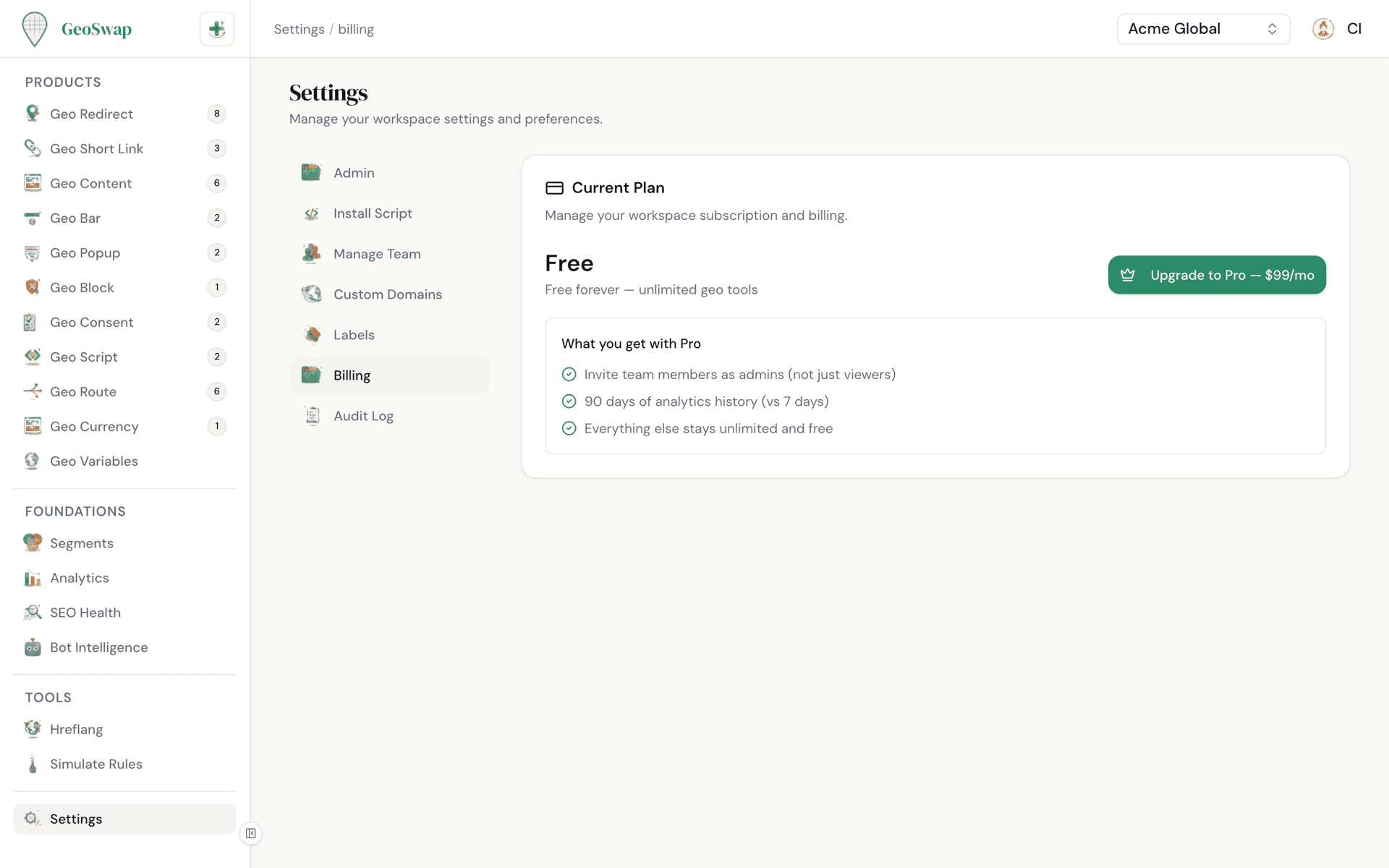
How to Upgrade
Upgrading takes about 60 seconds. Owners and admins can manage billing.

Go to Settings → Billing
Open your workspace settings and click on the Billing tab.

Choose Pro or Business
You'll be taken to a secure Stripe checkout page. Plans are billed monthly, per workspace, by card.

Complete checkout
Payment is processed securely by Stripe. Your new plan activates immediately.
Switching Plans & Cancelling
Everything about your subscription is managed from Settings → Billing. No emails to send, no support tickets to file.
Pro → Business: takes effect right away. You're charged the prorated difference for the rest of the billing period.
Business → Pro: takes effect right away, and the unused part of the Business fee is credited on your next invoice. Editors become viewers, because the Editor role is Business-only.
Cancel to Free: your workspace keeps its paid plan until the end of the current billing period. After that, admins and editors become viewers. Your owner access, rules, links, and data stay exactly as they are.
Business usage for the final month is billed on the closing invoice.
View invoices, update your card, or change billing details anytime in the Stripe customer portal.
Members who are moved to viewer get an email letting them know. An owner or admin can promote them again after upgrading.

Next up
See the full pricing breakdown and compare plans side by side.