
Segments
The building block of all geo-targeting in GeoSwap
What Are Segments?
A segment is a reusable group of visitors you want to target. Think of it like an audience in Google Ads, but for your website. You define who belongs in a segment — by country, state, city, radius, or IP address — and then use that segment across every GeoSwap product.
Create a segment once, and it works everywhere. Use it in your redirects, your notification bars, your content rules, your popups, your geo links — all of them. One segment, unlimited uses.
Example
Create a segment called "Europe" with all 27 EU countries. Now use that same segment in your geo redirects (send EU visitors to your .eu domain), your notification bars (show a GDPR consent notice), and your content rules (display Euro pricing). Update the segment once — say you add the UK after a policy change — and every rule using it updates automatically.
Why Segments Matter

The old way: country pickers everywhere
Traditional geo-targeting tools make you pick countries on every single rule. Have 20 redirect rules for Europe? You picked 27 countries 20 times. Need to add a country? Update all 20 rules manually. Miss one and you have a gap in your targeting.

The GeoSwap way: define once, use everywhere
Create your "Europe" segment once. Use it in any rule across any product. Update the segment and every rule that references it updates instantly. No searching through rules. No missed updates. No inconsistencies.
This is especially powerful for agencies managing dozens of rules across multiple products. Change one segment, and your entire geo-targeting strategy updates in sync.
Types of Segments
Every segment uses one match type. Here are the eight types you can choose from, with real-world examples for each. Switching the match type on an existing segment clears the locations you picked.

Country
Target visitors from specific countries. Pick one or more countries from the list, and any visitor located in those countries will match.
Example
"US & Canada" — United States and Canada
Use case
Redirect North American visitors to your .com store, or show USD pricing to US visitors.

Not Country
Target everyone EXCEPT specific countries. This is the inverse of country matching — every visitor who is NOT in the listed countries will match.
Example
"Not US" — Everyone outside the United States
Use case
Show a shipping notice to international visitors, or display a language switcher to non-English countries.

Exclusion segments (Not Country, Not State, Not City) match everyone outside your list, so they reach more countries than you might expect. Visitors whose location can't be determined never match, and search engine bots always see your original page. Positive matching is still easier to reason about.

State / Province
Target visitors in specific states, provinces, or regions. Pick a country, then pick its states from the list. The US, Canada, Australia, India, the UK, Germany, Brazil, Mexico, France, Japan, Italy, and Spain have pick lists. For other countries, enter ISO 3166-2 subdivision codes by hand.
Example
"California & New York" — Visitors from CA and NY
Use case
Show state-specific tax notices, legal disclaimers, or promotions for regional events.

Not State
Target everyone except specific states or provinces. Like Not Country, this is an exclusion-based match — anyone NOT in the listed regions will match.
Example
"Not Texas" — Everyone outside Texas
Use case
Show a promotion everywhere except states where a regulation applies.

City
Target visitors in specific cities. Type the city names, separated by commas. City matching depends on IP geolocation, so visitors on VPNs or mobile networks may not match. Best used for informational content rather than hard restrictions.
Example
"London, Paris, Berlin"
Use case
Show city-specific promotions, event notices, or store locator banners.

Not City
Target everyone except visitors in specific cities. Same exclusion logic as Not Country and Not State.
Example
"Not London" — Everyone outside London
Use case
Show a delivery notice to everyone outside the cities you deliver to.
Radius
Set a center point (latitude and longitude) and a radius in kilometers. The dashboard draws the circle on a map so you can check it. Any visitor within that circle matches.
Example
50km around your store in downtown Chicago
Use case
Show "Visit our store!" banners to nearby visitors, or target attendees near a conference venue.
IP Address
Target specific IP addresses or IP ranges. Supports IPv4, IPv6, and CIDR notation for ranges.
Example
192.168.1.0/24 or a specific office IP
Use case
Internal testing before going live, targeting partner networks, or office-only previews.
Preset Segments
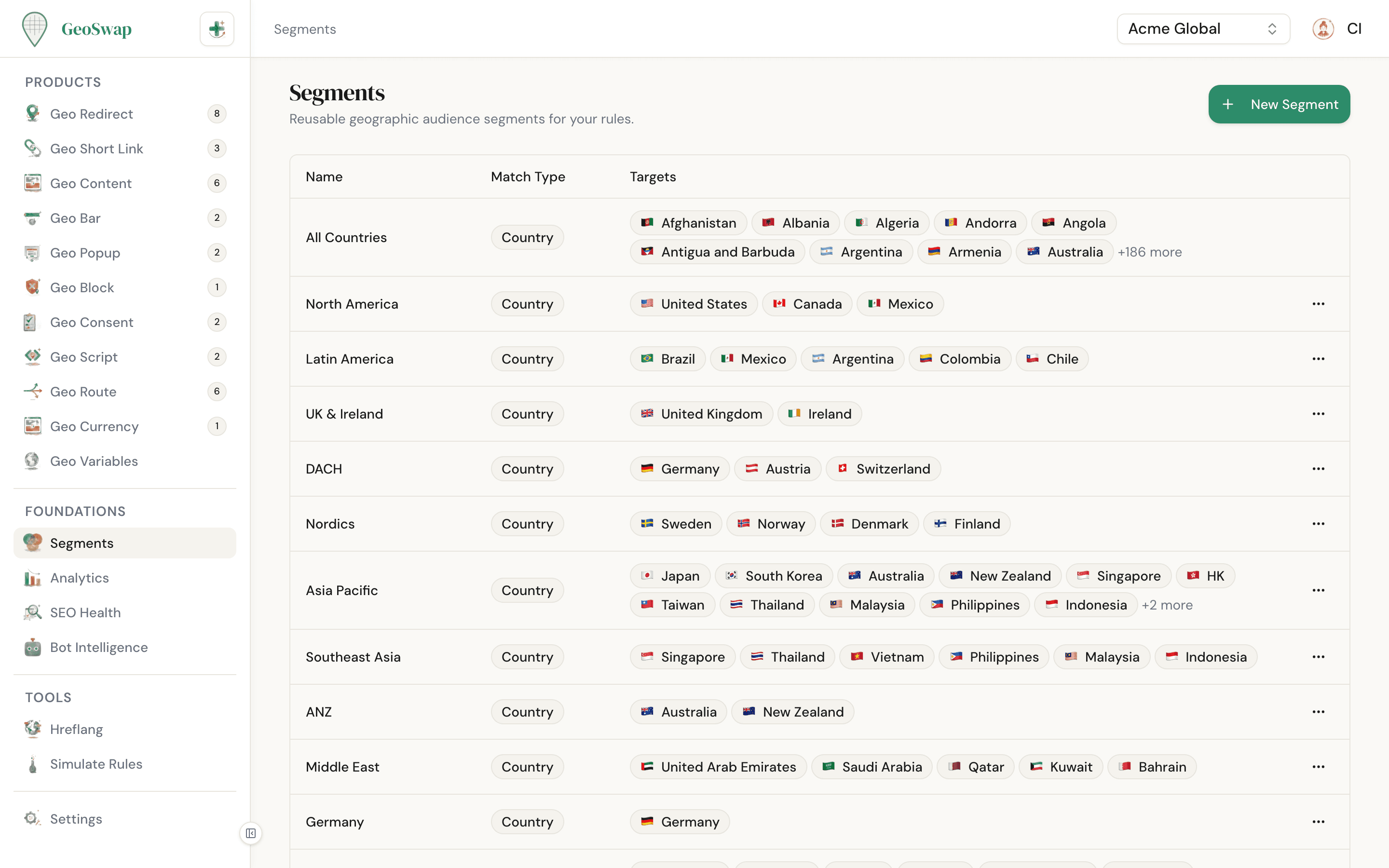
Don't want to build segments from scratch? Every new workspace comes with country segments for the most common regions already created. You'll find them on the Segments page, and you can edit, rename, or delete them like any segment you made yourself.
North America
Latin America
European Union
UK & Ireland
DACH
Nordics
Asia Pacific
Southeast Asia
ANZ
Middle East
The "All Countries" Segment
Every workspace comes with a special segment called All Countries. It's auto-created when you set up your workspace and it matches every visitor, regardless of location.

Matches all visitors — it's your universal catch-all
Can't be edited or deleted — it's always there as a safety net
Used by every Geo Route, and as the starting rule on new Geo Links
Perfect for your last rule: "if nothing else matches, do this"
Using Segments
The workflow is simple: create a segment, then use it in any product. Here's the flow.

Create your segment
Go to Segments in your dashboard and click New Segment. Pick a match type, add your locations, and give it a descriptive name.

Use it in any product
When you create a rule in Geo Redirects, Geo Content, Geo Links, Geo Bars, Geo Popups, or any other product — you'll pick a segment for each variant. Your saved segments appear in a dropdown, ready to use.

Update once, applies everywhere
Need to add a country? Edit the segment. Every rule that uses it picks up the change immediately. No need to hunt through rules or worry about missed updates.
Segments in the Dashboard
The Segments page in your dashboard shows all your segments at a glance, with the match type and targeted locations for each. Open a segment to see which rules use it.
Tips
Name segments descriptively: "EU — GDPR Region" is better than "Segment 1". Your future self will thank you.
Check segment usage before deleting. When you delete a segment, the dashboard lists the rules that use it. Deleting a segment also removes those rules.
Start with presets for common regions, then customize. It's faster than building from scratch.
Use positive matching (Country) over negative matching (Not Country) whenever possible. It's more predictable and SEO-safe.

Next up: Variants
Segments define who you're targeting. Variants define what they see.