
Custom Domains
Use your own domain for geo short links
Use Your Own Domain for Geo Links
By default, your geo short links use GeoSwap's short domain. But if you want your links to feel like your brand, you can add a custom domain.
Instead of gswp.me/promo, your links become geo.yourcompany.com/promo. Same smart geo-targeting, your brand front and center.
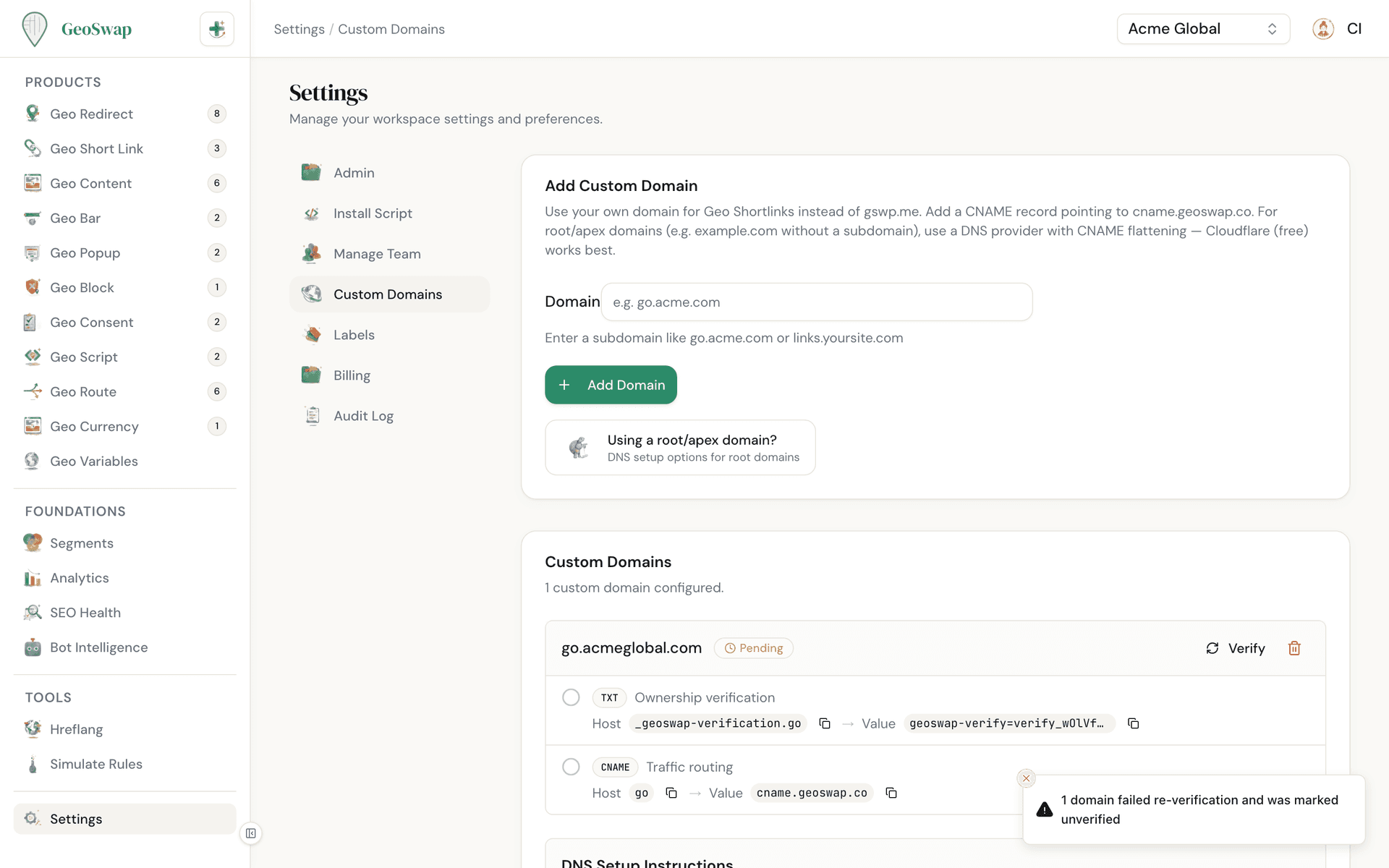
How to Set Up a Custom Domain
Adding a custom domain takes about five minutes. Here's the step-by-step:

Go to Settings
In your dashboard, navigate to Settings → Custom Domains.

Click "Add Domain"
Enter your domain (e.g., geo.yourcompany.com) and click Add Domain. We recommend using a subdomain rather than your main domain.

Add the TXT record
Copy the TXT record GeoSwap gives you and add it to your domain's DNS settings. The host looks like _geoswap-verification.geo and the value starts with geoswap-verify=. This proves you own the domain.

Add the CNAME record
Copy the CNAME record and add it to your DNS. This tells the internet to route traffic through GeoSwap's edge network.

Click "Verify"
GeoSwap checks both records. Once verified, your domain is live and you can pick it when you create a geo link. You don't have to keep clicking: GeoSwap re-checks pending domains each time you open the page, and emails you when a domain is verified.
DNS Records Explained
If you're not familiar with DNS, here's a plain-English explanation of the two records you need to add:
TXT record
A text-based record that proves you own the domain. It's like a digital signature — GeoSwap gives you a unique code, and adding it to your DNS proves the domain is yours.
CNAME record
A record that points your domain to GeoSwap's edge network. When someone visits your custom domain, the CNAME tells the internet to route that request through GeoSwap, where geo-targeting happens before the visitor sees the result.
Both records are required. The TXT record is for ownership verification, and the CNAME is for routing traffic. GeoSwap shows you the exact values to copy — no guesswork needed.
SSL Certificate

Automatic HTTPS
GeoSwap starts setting up SSL through Cloudflare as soon as you add your domain, and it finishes once your DNS records are in place. No manual certificate setup, no renewals to worry about. An icon next to each verified domain shows whether SSL is active or still provisioning.
Root Redirect
Someone will eventually type your short domain with no path, like geo.yourcompany.com/. Once the domain is verified, set a Root Redirect under the domain to choose where those visitors go, such as your homepage.
Using a Root Domain
Root domains (like example.com) can't use a normal CNAME record. If your DNS is on Cloudflare, add a CNAME for @ and Cloudflare flattens it for you. Otherwise, use the A records shown under Using a root/apex domain? on the Custom Domains page. A subdomain is still the simpler choice.
Tips

Use a subdomain (e.g., geo.yourdomain.com) rather than your main domain. This avoids conflicts with your existing website.
DNS changes can take up to 48 hours to propagate, but it’s usually much faster — often just a few minutes.
A custom domain can only be verified in one workspace at a time. Verifying it in another workspace removes it from the first one.
Admin or owner role is required to add and manage custom domains.
Deleting a custom domain also deletes every short link on it. GeoSwap tells you how many links will go before you confirm.
You can add multiple custom domains to the same workspace if you need links on different branded domains.

Next up
Setting this up for a company? Here's the checklist for your IT team.